Web Dev for Data People: A Survey of Options and a Way to Choose
in Blog
Almost every analysis I have worked on ends in the same small moment: someone needs to see it. A chart in a notebook is often enough to convince me, but it rarely convinces a colleague or stakeholder who is never going to open that notebook. A small web app can. It lets them move a slider, filter to their own region, or type in a value and watch the model’s answer change, which feels very different from looking at a screenshot.
The same skill has quietly helped me in a few other places. It makes exploring a dataset more interactive, it lets me demonstrate a model as a live service, and it helps me prototype a product idea before anyone spends engineering time on it.
What makes this so much more approachable today is that an LLM can write most of the boilerplate for you. Ask for a form, a route, or a chart callback and you will usually get something that works. But the difficulty does not disappear, it just moves. The assistant will happily build whatever you name, so the costly mistake now happens earlier: picking the wrong tool for the job and only discovering it three days in. Choosing well is still your part of the work, and that is what the rest of this post is here to help with.
This post walks through that choice in four moves. First, a map of the popular tools, sorted by the layer they occupy. Second, a way to break any use case into twelve functionalities, and a ladder that turns those into the lightest tool that covers them. Third, the two gaps that bite later, multi-user access and long-running jobs, followed by a worked comparison of two real stacks on the same problem. Last, a skill file that packages the whole method for your own AI assistant. You only need Python and pandas and a rough idea of what an HTTP API is; no web development background is assumed.
- A Field Too Wide to Browse
- Ask What the App Must Do, Not Which Framework
- From Functionalities to a Stack
- Pretty Enough for Business Users
- Two Gaps That Bite Later
- Two Real Stacks, One Problem
- Try It: A Skill File
- Summary
A Field Too Wide to Browse
Search for “how to build a web app” and you will meet dozens of tools with overlapping claims. It helps to sort them by the layer they occupy, because most of the confusion comes from comparing tools that are not competitors.
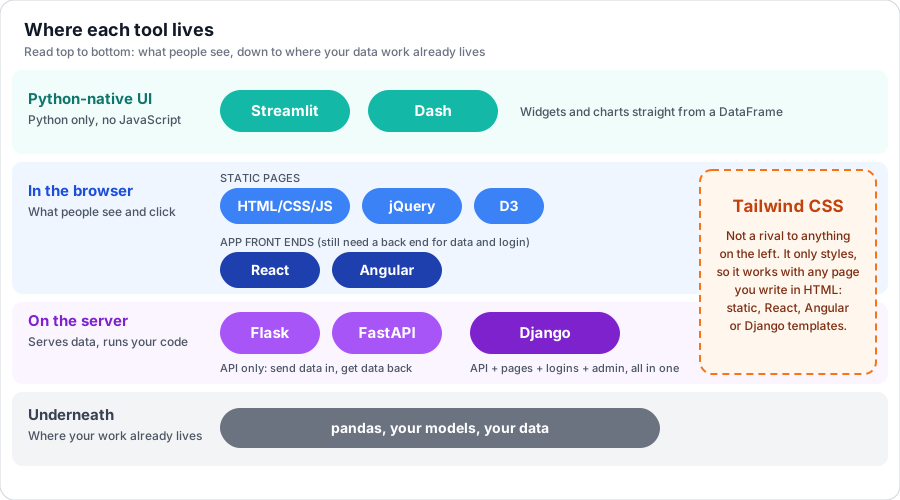 Fig. 1. The popular tools placed by the layer they occupy, from what people see (top) down to where your data work already lives. Tools in the same band are alternatives to each other; tools in different bands usually combine. Tailwind CSS is drawn across the browser and server bands because it only styles pages and pairs with any of them.
Two things in this map are easy to miss. First, Tailwind is not a rival to Django or React. It only styles, so it combines with any layer where you write HTML. Second, React and Angular sit on the same rung. Both are front ends that still need something else to supply data and handle login. They are not alternatives to Flask or Django.
For anyone who lives in Python, the Python-native layer deserves special attention. Streamlit and Dash let you stay in Python, with no JavaScript at all, and for many tasks that is the whole answer.
Ask What the App Must Do, Not Which Framework
The way out of the option overload is to stop asking “which framework?” and start asking “what does this app have to do?” Any web app is some combination of the same twelve capabilities.
| # | Functionality | What it means |
|---|---|---|
| 1 | Presentation | Show static content |
| 2 | Styling and layout | Make it look decent and consistent |
| 3 | Client interactivity | Filters and tooltips without a page reload |
| 4 | API: providing | Expose data or a model over HTTP |
| 5 | API: consuming | A page or service calls an API |
| 6 | Server-side compute | Run pandas or a model per request |
| 7 | Persistence | Save records |
| 8 | Forms and CRUD | Validated create, edit and delete |
| 9 | Authentication | Who is this user? |
| 10 | Authorization | What may they do or see? |
| 11 | Session and state | Remember a user’s choices |
| 12 | Background and long jobs | Work that outlives one request |
Take a use case and tick the rows it needs. A chart you want to share needs 1, 2 and 3. A dataset explorer needs 3 and 6. A labeling tool needs 7 through 10 on top. The number of ticks is the signal. Each extra tick from persistence onward is a reason to reach for a heavier tool, because that is where a framework that ships several of them together starts paying for itself.
From Functionalities to a Stack
Once you have the ticks, pick the lightest tool that covers them. I think of it as a ladder, and you should only climb when a rung fails you.
Start at the lowest rung that covers every functionality you ticked. Climb only when you can name the specific thing the rung below cannot do.
- Static HTML and D3: show a finished result. No server at all.
- Streamlit or Dash: explore data, or build a tool for peers. Python only.
- Flask or FastAPI: serve a model or data over HTTP.
- Django with a Tailwind kit: users, a database, forms, and an admin. A multi-user prototype.
- React or Angular over an API: only when the UI is genuinely app-like.
Applied to concrete cases:
| Use case | Functions | Pick |
|---|---|---|
| Share a finished chart | 1, 2, 3 | Static HTML and D3 |
| Explore a dataset | 3, 6 | Streamlit |
| Peer dashboard | 3, 6 | Dash |
| Demo a model | 4, 6 | FastAPI, whose /docs page is a free test form |
| Labeling or review tool | 7 to 10 | Django |
| Pipeline that ends in a page | 1, 3 | Python writes JSON, D3 renders it |
Your audience shifts the pick too. A raw Streamlit page is fine for fellow data people and can look unfinished to a manager. If the people using the tool are not technical, they judge by polish, and that pushes you toward the next section.
There is an honest caveat about the top rung. React with Tailwind is a very common combination and a good one, but it is two projects (a front end and a back end), a build step, and authentication you write yourself. Django gives you the whole thing in one project. This is the single-page application (SPA) approach: the browser loads one page and updates it by calling the API, instead of loading a new page for each click. I would choose it when the interface needs instant, keyboard-driven or drag-and-drop behaviour, or when other systems also need the API, and not before.
Pretty Enough for Business Users
Raw Tailwind gives you utility classes, not a design. To get a look that people recognise as standard, add a component kit on top: ready-made buttons, cards, tables and navigation bars.
| Option | Good for |
|---|---|
| Django templates, Tailwind and daisyUI | A clean prototype with no React. My default suggestion |
| React, Tailwind and shadcn/ui | The best-looking and most customisable, at the highest setup cost |
| Dash with dash-bootstrap-components | Tidy dashboards out of the box |
| Django admin | Back-office screens for free |
Tailwind normally needs Node to compile, which is a barrier if Python is your home turf. It has a standalone command-line build that needs no Node(1), and you can even install it through pip. daisyUI 5 is designed for Tailwind 4(2).
Two Gaps That Bite Later
Two topics rarely appear in “build a dashboard in ten minutes” tutorials, and both arrive the moment a demo becomes a product.
Multi-user
A tool with several users has to solve six things. Authentication verifies who someone is. Authorization decides what each user may do. Data isolation makes sure user A never sees user B’s rows. There is also per-user state, concurrent writes (SQLite is fine locally, and a real app usually wants Postgres), and an audit trail.
The tools differ sharply here:
| Tool | What you get |
|---|---|
| Django | Authentication, sessions, groups and permissions, all built in |
| FastAPI | Nothing built in. The docs show an OAuth2 and JWT pattern. The popular fastapi-users package is in maintenance mode(3) |
| Streamlit | Built-in OpenID Connect login with providers such as Google or Microsoft(4), but no roles |
| Dash | dash-auth offers HTTP Basic Auth only, with no logout(5) |
| React, Angular | Login screens only. Real security lives on the server |
The rule I keep repeating to myself: authorization is enforced on the server. Hiding a button in React protects nothing. And a Streamlit detail worth knowing early: its data cache is shared across all users, so caching something tied to one person hands it to the next.
Long-running jobs
A web request has to answer in seconds. Retraining a model does not. The shape of the fix is always the same: the request starts the job and returns at once, the job runs somewhere else, its status is stored, and the page checks back every few seconds.
The tooling has surprising traps, especially on Windows:
| Need | Tool | Catch |
|---|---|---|
| Tiny work after a response | FastAPI BackgroundTasks | Runs in the web process, no persistence or retries(6) |
| Simple queue, no Redis | Huey with SQLite storage(7) | Smaller ecosystem |
| Simple queue with Redis | RQ | Uses os.fork, so no native Windows support(8) |
| Full-featured queue | Celery | Windows is unsupported by the project(9) |
| Django’s own API | django.tasks in Django 6.0 | Defines how to enqueue, but ships no worker and no retries(10) |
My default for anyone working on a laptop: polling plus a job-status table, and Huey with SQLite for the worker. Reach for Celery, or for a pipeline tool such as Prefect or Dagster, when you actually need retries and scheduling.
Two Real Stacks, One Problem
To make the trade-offs concrete, take a labeling tool. Reviewers label rows and the results are saved. Admins see everyone’s labels and manage users. A reviewer sees only the rows assigned to them. A long job re-scores the data with a new model.
That touches almost all twelve functionalities, so it is a fair test. Compare Django (one project) with FastAPI, React and Tailwind (two projects):
| Concern | Django | FastAPI, React, Tailwind |
|---|---|---|
| Login and users | Built in | You build it |
| Ownership filtering | A queryset filter, one line | A check in every endpoint |
| Forms and validation | Automatic | Pydantic plus client-side form state |
| Back-office screens | The admin gives users and labels for free | You build them |
| API for other systems | Add Django REST Framework | Built in, with automatic docs |
| Interface feel | Page loads, plus a little JavaScript | Instant, app-like |
For a small team, Django wins on time: the admin alone covers user management and label export. FastAPI and React win when the labeling interface has to be fast and keyboard-driven, when another system also needs the API, or when a front-end engineer will own the UI. If you start with Django and outgrow it, you can add an API later and put React in front without throwing away the data model.
Try It: A Skill File
Reading a survey is not the same as using one. So I turned this whole structure into a skill: a Markdown file that an AI coding assistant loads when you describe an app idea. It asks about your audience and whether users log in, breaks the idea into the twelve functionalities, and recommends the lightest tool for each, while flagging the gaps above.
The head of the file looks like this:
---
name: web-stack-advisor
description: Recommend the lightest web tooling for a data professional's use case (data scientist, analyst, data or ML engineer): share a chart, explore data, serve a model, labeling tool, dashboard, multi-user product prototype. Breaks the use case into 12 web functionalities and maps each to a tool. Use when the user asks "what should I build this with" or describes an app idea for a demo, data exploration or product prototype.
---
Download the skill from its GitHub folder and drop the folder into the .claude/skills/ directory of any project, then describe an app you have been meaning to build. The reference notes it ships with are written from documentation, and I have not run every starter snippet myself, so treat them as a first draft to check.
One limit to be upfront about: everything here assumes the app runs on your own machine. Deployment is a separate decision that depends on your team, but if your end users are business people, “it works on my laptop” will not survive contact with them.
Summary
The throughline is to decompose before you choose. Web development is not one decision but twelve small ones, and most tools only cover some of them. Once a use case is written as a set of functionalities, the tool choice mostly falls out: the fewest tools that cover every tick, starting from the lightest rung and climbing only for a reason you can name.
Three lessons recur. Audience matters as much as architecture, because a peer forgives a plain page and a business user does not. Multi-user concerns and long-running jobs are the two places where a demo silently becomes a product, and each tool handles them very differently. And an LLM makes writing the code cheap, which makes the choice of what to write the one part worth your careful attention.