The Model Only Asks: Following One Question Through a Tool-Calling Chatbot
in Blog
For a long time my picture of an “agent chatbot” was simple: you type, the model types back, repeat. I knew that tool calling was what let a chatbot look things up, run code or call an API, and I had used products that did it. But if you had asked me what actually happens between my question and the answer, who calls what, and how the model even knows a tool exists, I would have waved my hands. So I built a small one to find out.
The use case is Quick Math Coach, a chatbot that teaches mental-maths shortcuts: small tricks that make a sum easy to do in your head. You ask the chatbot “What is 47 + 9?” and it teaches you the shortcut for adding 9: add 10, take away 1, 56. It is a good subject for learning tool calling, because language models are famously unreliable at arithmetic, so the chatbot has a real reason to hand the maths to Python. That makes the line between “what the model does” and “what my code does” sharp and easy to see.
This post follows one question through that chatbot from start to finish: first the idea behind the design, then the whole trip in one picture, then six stages, one section each, and last a follow-up question and how to test it all without an API key. You only need to read Python and to have called a chat API once; no agent framework is used or assumed. The code is on GitHub.
- A Chatbot That Is Not Allowed to Do Maths
- The Whole Trip Before the Details
- Stage 1: The Transcript Is the Memory
- Stage 2: The Menu of Tools
- Stage 3: The Model Only Writes a Note
- Stage 4: Turning the Note Into a Function Call
- Stage 5: Choosing the Shortcut Without the Model
- Stage 6: Back to the Model, Round After Round
- A Follow-up Question, Start to Finish
- Testing Without an API Key
- Summary
A Chatbot That Is Not Allowed to Do Maths
Before following a question, it helps to know what the chatbot is trying to protect.
Ask a language model for a quick way to work out 97 × 96 and you will usually get a confident explanation. Often it is right. Sometimes a step quietly does not add up, and a learner has no way to tell. For a tutor, that is the worst kind of mistake: wrong, but convincing.
So Quick Math Coach splits the work in two. The model does what it is good at: reading a messy human question (“add up the first 10 odd numbers”, “2 h 45 min + 1 h 30 min”) and explaining the result kindly. Python does everything that has to be right: choosing which shortcut applies, doing every calculation, and checking each answer against plain arithmetic before the model ever sees it.
The model decides what to ask. Your code decides what is true.
The repo is small, and each file has one job:
| File | Its job |
|---|---|
app.py | The Streamlit chat page: shows messages, streams the agent’s steps, collects feedback |
agent/workflow.py | TutorAgent, the loop that talks to the model and runs tools (about 50 lines) |
agent/prompts.py | The system prompt: the rules the model follows |
tools.py | The three tools the model can ask for, their schemas, and dispatch |
domain.py | The data model: Pydantic classes for a problem, its steps and its solution, plus the rules for what a valid problem is and how to get its exact answer |
registry.py, techniques/ | 40 shortcuts, and the code that picks the best one |
In short, the split is language versus maths. The model reads the question and words the explanation; Python chooses the shortcut, does the arithmetic and checks it. As a result, every number in an answer comes from Python, and the only thing left to the model’s judgement is understanding the question correctly.
The Whole Trip Before the Details
Here is the whole journey of one question, before we zoom into any part of it.
I find it helps to picture the model as a very well-read person sitting in a closed room. There is a slot in the door. They cannot see your screen and cannot run anything. And, strangest of all, they remember nothing from one visit to the next. All they can do is read the papers you push through the slot, and push one reply back. The reply is either an answer for the user or a note asking for a tool: “please run this tool with these numbers for me”. From here on, a note always means that second kind, and a request is what our code pushes in through the slot. Everything else in this post is the detail of what goes through that slot.
Here is what happens when you type “What is 47 + 9?”:
- The transcript. The page adds your question to a Python list called
messages. That list is the conversation. - The menu.
TutorAgentsends the model three things: the system prompt, the wholemessageslist, and a description of the tools it may ask for. - The note. The model does not answer. It replies with a note: call
solve_with_shortcutwitha=47,operation="+",b=9. - Dispatch. Our code reads that note, checks the arguments, and calls the real Python function with that name.
- The shortcut. Python picks the best shortcut (
add_nines), works out 47 + 10 = 57 and 57 − 1 = 56, and checks 56 against a plain 47 + 9. The result is added tomessages. - Back to the model.
TutorAgentsends everything again, now including the result. This time the model has what it needs, so it writes the answer, and the page shows it.
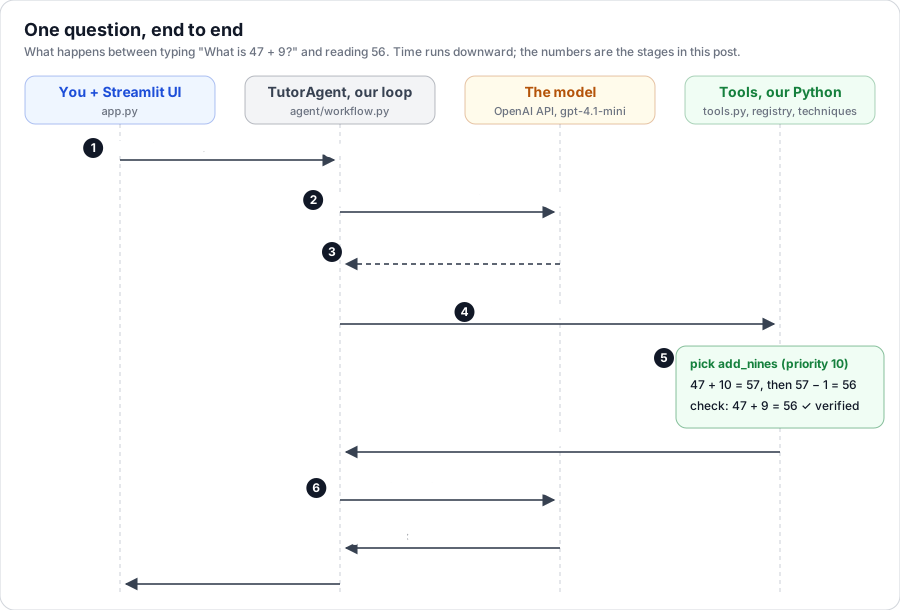 Fig. 1. One question, end to end. Each column is one part of the system and time runs downward; the numbers match the six stages. The dashed arrow is the model’s note, which carries no result.
This is the answer the model wrote at the end of that run, word for word:
A great shortcut for adding 9 is to add 10 first and then subtract 1.

Steps:
1. Add 10 to 47 to get 57.
2. Subtract 1 from 57 to get 56.

The answer is **56**.

Try this one: What is 63 + 9?
Two things in this picture are easy to miss. First, the model was called twice for one question: once to ask, once to answer. Second, look at which column the arithmetic sits in. The model never added anything. It read 56 off the tool’s result and explained it.
A word on where the traces come from. Every trace in this post is from a real run against gpt-4.1-mini on 18 October 2026, recorded with a thin wrapper around the OpenAI client that saved each request and response. Tool results are copied as returned. In code and traces, ... or … marks text I cut to keep things short.
Now let’s walk through the stages one at a time.
Stage 1: The Transcript Is the Memory
The first question is the one I had wrong for longest: where does the conversation live?
I assumed the model remembered it. It does not. Each request stands alone; the OpenAI docs say it plainly: “each text generation request is independent and stateless”(1). If the model seems to remember your last question, it is only because someone sent it again.
In this app, that someone is a plain Python list:
messages: list[dict] = st.session_state.setdefault("messages", [])
...
messages.append({"role": "user", "content": prompt})
for event in agent.run(messages):
    ...
st.session_state is Streamlit’s way of keeping variables between reruns of the page, for each browser session(2), so the list survives as you keep typing. agent.run appends to that same list in place: the model’s notes, the tool results and the final answer all go in. By the end of a turn, the list is the complete record of what happened.
I call this list the transcript. The API docs call it the conversation history, which is accurate but undersells it. A transcript is a word-for-word record of everyone who spoke, in order, and that is exactly what this list holds: your messages, the model’s, and the tools’ results, including the parts you never see on screen.
Every time TutorAgent calls the model, it builds the request like this:
response = self.client.chat.completions.create(
    model=self.model,
    messages=[{"role": "system", "content": SYSTEM_PROMPT}, *messages],
    tools=tools.tool_specs(),
    tool_choice=tool_choice,
)
Notice that the system prompt is put at the front of every request but never stored in messages. Change the prompt, and the very next request uses the new one, even in the middle of a conversation.
This is where the closed room earns its keep. Each request is like a fresh person walking into the room with no memory, handed the entire transcript, and asked “what next?”. That has a cost. In the real runs, the smallest request (system prompt, tool menu and one short question) was already about 1,500 prompt tokens, and every round added a couple of hundred more, because everything is sent again. Nothing in this app trims the list, which is fine for a tutoring chat but would matter for a long one.
The practical consequence: if you want to know what the model knew, read the list. That is also why each chat is saved as a JSON log. When an answer goes wrong, the log shows exactly what the model was sent.
Stage 2: The Menu of Tools
The request has gone out. How does the model know it can ask for a tool at all, and what to put in the note?
It reads a menu. The tools= argument is a list of tool descriptions written as JSON Schema: a name, a sentence about when to use it, and the shape of its arguments. The model never sees the Python function. It sees only this description, and it has been trained to reply with notes that fit it.
I don’t write the schema by hand. I write a Pydantic class and let Pydantic generate the schema(3). Here is the class for the main tool, in full:
class SolveArgs(BaseModel):
    a: Number = Field(
        description="First operand, exactly as written in the question. For '/': the number being divided. "
        "For a series: its first term. For a sum of squares or cubes: the first number squared or cubed. "
        "For 'add_time': the first time as hours and minutes run together, e.g. 245 for 2 h 45 min (2:45), "
        "45 for 45 minutes, 300 for 3 hours. For 'power': the number being raised to the power."
    )
    operation: Operation = Field(
        description="Arithmetic operation. Use 'series' for the sum of numbers that go up by the same step, "
        "e.g. 1 + 2 + … + 100, or 'the first 10 odd numbers' (1 + 3 + … + 19). Use 'sum_of_squares' for "
        "the sum of the squares of consecutive whole numbers, e.g. 1² + 2² + … + 10², or "
        "'the sum of the squares of the first 10 numbers'. Use 'sum_of_cubes' the same way for cubes, "
        "e.g. 1³ + 2³ + … + 10³. Use 'add_time' to add two lengths of time in hours and minutes, "
        "e.g. 2:45 + 1:30. Use 'power' for a number to a power, e.g. 14³ or 'the cube of 14' "
        "(a = 14, b = 3); for a square you may use '*' with the number twice."
    )
    b: Number = Field(
        description="Second operand, exactly as written in the question. For a series: its last term. "
        "For a sum of squares or cubes: the last number squared or cubed. "
        "For 'add_time': the second time, written the same way as a. For 'power': the power, e.g. 3 for a cube."
    )
    step: int = Field(
        default=1,
        description="Only for 'series': the gap between terms, e.g. 1 for 1 + 2 + 3 + …, "
        "2 for 2 + 4 + 6 + … or 1 + 3 + 5 + ….",
    )
    technique: str | None = Field(
        default=None,
        description="Only set this if the user explicitly asks for a specific shortcut "
        "(use a name from list_shortcuts). Otherwise leave empty and the best one is chosen.",
    )
Number is this project’s own type for a whole number or an exact decimal, and Operation is an enum of the nine operations. You will see both again in the schema below.
Each tool goes on the menu as a name, a sentence saying when to use it, and the schema of its arguments. This is the entry for solve_with_shortcut in tool_specs(), the list that Stage 1 passes as tools= with every request:
def tool_specs() -> list[dict[str, Any]]:
    return [
        {
            "type": "function",
            "function": {
                "name": "solve_with_shortcut",
                "description": "Explain step by step how to compute `a <operation> b` (or the sum of a "
                "series from a to b, or of the squares or cubes from a to b) mentally using "
                "the best matching shortcut. Returns verified steps and the answer. "
                "Always call this for a calculation question instead of computing yourself.",
                "parameters": SolveArgs.model_json_schema(),
            },
        },
        ...  # check_answer and list_shortcuts, built the same way
    ]
And here is what SolveArgs.model_json_schema() turns into, with the descriptions removed so you can see the shape (lightly simplified: Pydantic puts the enum in a separate $defs block):
{
  "properties": {
    "a":         {"type": "number"},
    "operation": {"enum": ["+", "-", "*", "/", "series", "sum_of_squares",
                           "sum_of_cubes", "add_time", "power"]},
    "b":         {"type": "number"},
    "step":      {"type": "integer", "default": 1},
    "technique": {"anyOf": [{"type": "string"}, {"type": "null"}], "default": null}
  },
  "required": ["a", "operation", "b"]
}
Three things about this menu surprised me.
The descriptions are prompts. That “245 for 2 h 45 min” in the description of a is not documentation for humans. It is how the model learns to turn “2 h 45 min” into the number 245. Most of the “parsing” in this app is done by a few well-chosen examples inside field descriptions.
An enum is a fence. operation can only be one of nine strings. The model cannot get away with "^" or "times"; if it tries, Stage 4 rejects it.
Types are handled twice. The schema asks the model for numbers. But the model writes text, and text can say anything, so when the note comes back, Pydantic checks it and converts it on our side: "4.7" becomes an exact Decimal("4.7"), 47.0 becomes the integer 47, "+" becomes Operation.ADD. One class, used in both directions.
There are three tools on the menu: solve_with_shortcut to work something out, check_answer to check an answer the user already has (with digit sums), and list_shortcuts. How does the model choose between them? Nothing in my code decides. The model reads the tool descriptions and the system prompt, which has rules such as “If the user asks whether an answer is right … call check_answer”.
And when none of the three fits? Then the model writes no note and answers in plain text, and the system prompt tells it what to say. For a question the tools cannot handle, like a square root: “If the question needs anything else, say so kindly.” For a question that is not about maths at all: “gently steer back to mental math.” What it is never told to do is have a go at the arithmetic itself; rule 1 of the prompt is “Never do the arithmetic yourself”. One near miss is worth keeping apart: a calculation the tool can work out but no shortcut fits. Then the tool still runs, returns "found": false with the plain answer, and the prompt says to “say you don’t know a shortcut for this one yet and give the answer from the tool.” Even when there is no trick, the number still comes from Python.
Stage 3: The Model Only Writes a Note
This is the stage that changed my mental model. When the model “calls a tool”, what actually happens?
Nothing runs. The model sends back a message like any other reply, except that instead of text for the user, it holds a structured tool call. From the real run, this is the whole of the model’s first reply to “What is 47 + 9?”:
"tool_calls": [{
  "id": "call_...",
  "type": "function",
  "function": {
    "name": "solve_with_shortcut",
    "arguments": "{\"a\":47,\"operation\":\"+\",\"b\":9}"
  }
}]
Look closely at arguments. It is a string that contains JSON, not an object. The model wrote it character by character, the same way it writes a sentence. A tool call is a note.
So who reads the note? Not OpenAI. The API delivers the reply to us and stops there. The OpenAI guide describes exactly this order: you “receive a tool call from the model”, run it yourself, then “make a second request to the model with the tool output”(4). The running happens in our own process, in TutorAgent:
msg = self._complete(messages, tool_choice="auto")

if not msg.tool_calls:  # the LLM decided it has enough to answer
    ...                 # show msg.content to the user
else:
    ...                 # run each of msg.tool_calls ourselves
That if is the entire decision between “the model is done” and “the model wants something”. No tool calls: it is an answer, so show it. Tool calls: our code runs each one. (This is simplified; the full loop is in Stage 6.)
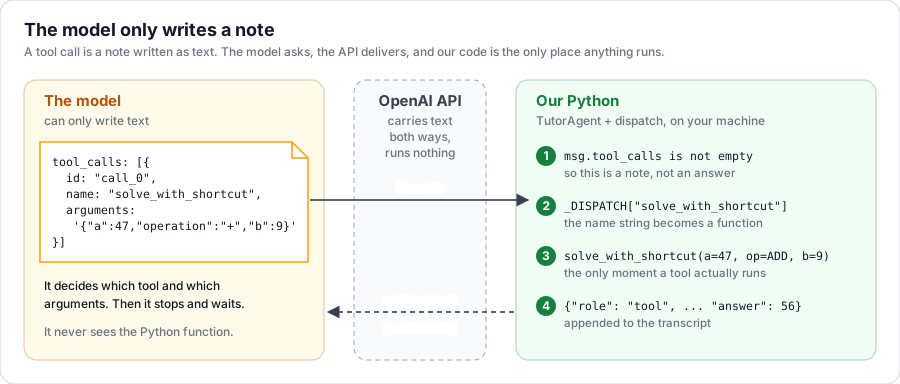 Fig. 2. The model only writes a note. The note travels as text through the API, and the four numbered steps on the right are the only place anything runs. The result goes back to the model inside the next request.
The model never runs your tool. It writes a note asking you to.
Once you see it this way, a lot falls into place. The model cannot do anything you did not give it a tool for, because it can only ask, and your code only acts on names it knows. A tool is not a plugin installed inside the model. It is a promise: if the model writes this note, your code will act on it.
Stage 4: Turning the Note Into a Function Call
The note is just a name and a string. Something has to turn "solve_with_shortcut" and '{"a":47,...}' into a real Python call, and do it safely. That something is dispatch:
_DISPATCH = {
    "solve_with_shortcut": (solve_with_shortcut, SolveArgs),
    "check_answer": (check_answer, CheckArgs),
    "list_shortcuts": (list_shortcuts, None),
}


def dispatch(name: str, arguments: dict[str, Any]) -> dict[str, Any]:
    """Run a tool call from the LLM. Errors are returned (not raised) so the agent can recover."""
    if name not in _DISPATCH:
        return {"error": f"Unknown tool: {name}"}
    func, schema = _DISPATCH[name]
    try:
        if schema is None:
            return func()
        return func(**dict(schema.model_validate(arguments)))
    except (ValidationError, ValueError, RuntimeError) as e:
        return {"error": str(e)}
A dictionary maps each tool name to a function and its schema. That is the whole trick. Let’s play computer with a slightly awkward note, where the model sent a as a string: {"a": "4.7", "operation": "*", "b": 1000}. These are the actual values at each step:
- Parse.
json.loads, inTutorAgentjust beforedispatch, gives{'a': '4.7', 'operation': '*', 'b': 1000}. Still a string, still a star. - Look up.
_DISPATCH["solve_with_shortcut"]gives the function andSolveArgs. - Validate.
SolveArgs.model_validategivesa=Decimal('4.7'), operation=Operation.MULTIPLY, b=1000, step=1, technique=None. Types fixed, defaults filled in. - Call.
solve_with_shortcut(...)builds aProblem, which checks its own rules (no dividing by zero, minutes under 60, and so on), and solves it:multiply_by_power_of_10moves the decimal point three places to get 4700. - Return. A plain dict, which
TutorAgentturns into JSON and appends tomessagesas arole: "tool"message.
That last step answers a question I had for a while: how does the model know which result belongs to which note? Every note comes with an id, and TutorAgent files the result under the same id:
messages.append({"role": "tool", "tool_call_id": call_id, "content": json.dumps(result, ensure_ascii=False)})
With one note per reply this hardly matters. With several, as you will see in Stage 6, it is the only thing that ties each answer to its question.
Why not just call the function directly? Because the note comes from a model, and a model can write anything. Here is what dispatch returned for a few bad notes I fed it (Pydantic’s messages trimmed):
| The note | What comes back |
|---|---|
tool name solve_and_explain | Unknown tool: solve_and_explain |
"a": "forty-seven" | Input should be a valid integer ... Input should be a valid decimal |
"operation": "^" | Input should be '+', '-', '*', '/', 'series', ... or 'power' |
"b": 0 with / | Cannot divide by zero. |
add_time with "b": 175 | 175 has 75 minutes; write times as hours and minutes run together, e.g. 315 for 3:15. |
None of these raise. Each comes back as {"error": ...}, goes into the transcript like any other result, and the model reads it in the next round. That turns a crash into a conversation: the error message becomes the instruction for the model’s next attempt. You will see this happen for real in Stage 6.
The practical consequence: write error messages for the model, not for yourself. “175 has 75 minutes; write times as … e.g. 315 for 3:15” tells the model exactly how to fix its note.
Stage 5: Choosing the Shortcut Without the Model
Inside solve_with_shortcut, the model is out of the picture. This stage answers two questions: with 40 shortcuts, how does Python pick one, and how do we know its answer is right?
Each shortcut is a small class. Here is the one that fired for 47 + 9, with the rule text shortened:
class AddNines(Technique):
    name = "add_nines"
    title = "Adding 9, 99, 999, …"
    rule = "Adding a number made only of 9s is the same as adding the next power of 10 and then subtracting 1 ..."
    operation = Operation.ADD
    priority = 10

    def _applies(self, problem: Problem) -> bool:
        return is_nines(problem.a) or is_nines(problem.b)

    def steps(self, problem: Problem) -> tuple[list[Step], int]:
        nines, n = (problem.b, problem.a) if is_nines(problem.b) else (problem.a, problem.b)
        round_up = nines + 1
        plus_round = n + round_up
        answer = plus_round - 1
        return [
            Step(say=f"{nines} is {round_up} − 1, so first add {round_up}", expr=f"{n} + {round_up}", result=plus_round),
            Step(say="Then take away the extra 1", expr=f"{plus_round} − 1", result=answer),
        ], answer
Picking one is a filter and a sort:
def find_applicable(problem: Problem) -> list[Technique]:
    """Techniques that apply to `problem`, best first."""
    return sorted(
        (t for t in TECHNIQUES if t.applies(problem)),
        key=lambda t: t.priority,
        reverse=True,
    )
Ask every shortcut “do you apply?”, keep the ones that say yes, and take the one with the highest priority. Exact special cases like adding 9 sit at 10; catch-all methods sit near 0. For 129 + 99, three shortcuts applied and add_nines beat round_and_compensate and add_in_parts. The losers are still sent back as other_applicable_shortcuts, so the model can offer them if the user asks for another way. TECHNIQUES itself is a plain list in techniques/__init__.py with one instance of each shortcut class, so adding a shortcut means writing its class and adding it to that list.
Then comes the safety net. No shortcut’s answer leaves this stage unchecked:
def solve(self, problem: Problem) -> Solution:
    if not self.applies(problem):
        raise ValueError(f"{self.name} does not apply to {problem}")
    steps, answer = self.steps(problem)
    if answer != problem.exact():
        raise RuntimeError(f"{self.name} produced {answer} for {problem}, expected {problem.exact()}")
    return Solution(technique=self.name, problem=str(problem), rule=self.rule,
                    steps=steps, answer=answer, verified=True)
problem.exact() is the boring way: plain 47 + 9. If a clever shortcut ever disagrees with boring arithmetic, it raises, dispatch turns that into an error, and the model never sees a wrong answer dressed up as a trick.
Here is what leaves this stage for 47 + 9, exactly as the model receives it in the content of the tool message (pretty-printed, rule text trimmed):
{
  "found": true,
  "solution": {
    "technique": "add_nines",
    "problem": "47 + 9",
    "rule": "Adding a number made only of 9s is the same as adding the next power of 10 and then subtracting 1, ...",
    "steps": [
      {"say": "9 is 10 − 1, so first add 10", "expr": "47 + 10", "result": 57},
      {"say": "Then take away the extra 1", "expr": "57 − 1", "result": 56}
    ],
    "answer": 56,
    "verified": true
  },
  "other_applicable_shortcuts": []
}
Compare it with the answer the model wrote in The Whole Trip: “Add 10 to 47 to get 57. Subtract 1 from 57 to get 56.” Every number in that answer is here. The model only reworded the say lines.
Stage 6: Back to the Model, Round After Round
The result is in the transcript. TutorAgent sends everything back and the model decides again. The question for this stage: what happens when one tool call is not enough?
Here is the full loop, with the event plumbing simplified:
def run(self, messages):
    for _ in range(self.max_rounds):                       # max_rounds = 5
        msg = self._complete(messages, tool_choice="auto")
        if not msg.tool_calls:                             # an answer: done
            messages.append({"role": "assistant", "content": msg.content or ""})
            yield FinalAnswer(msg.content or "")
            return
        messages.append(...)                               # the note
        for tc in msg.tool_calls:
            yield from self._run_tool(tc.id, tc.function.name, tc.function.arguments, messages)

    # Out of rounds: make the LLM answer with what it has, no more tools.
    msg = self._complete(messages, tool_choice="none")
    ...
Notice what the loop does not contain: a plan. It has no idea that “120 + 9 + 9” needs two calls. It just keeps going while the model keeps writing notes. The model, re-reading the transcript each round, decides what to do next; tool_choice="auto" is what lets it choose between calling tools and answering(4).
Chaining, One Note at a Time
Here is “Work out 120 + 9 + 9” from the real run:
request 1  model sees: system + question                        (1,497 prompt tokens)
           → note: solve_with_shortcut({"a":120,"operation":"+","b":9})
           ← add_nines: 120 + 10 = 130, 130 − 1 = 129. answer 129

request 2  model sees: system + question + note 1 + result 1     (1,703 prompt tokens)
           → note: solve_with_shortcut({"a":129,"operation":"+","b":9})
           ← add_nines: 129 + 10 = 139, 139 − 1 = 138. answer 138

request 3  model sees: everything above                          (1,909 prompt tokens)
           → no note. Answer: "... So, 120 + 9 + 9 = **138**."
The model could not have planned the second call in advance. It did not know 129 until the first result came back, and the system prompt forbids it from adding numbers itself. So it asks, reads, and asks again. Chaining is not a feature in the code. It is the model being handed a longer transcript each time.
Two Notes at Once
When the parts do not depend on each other, the model can write several notes in one reply. “What’s 13 × 14 and 48 × 5?” took only two requests:
request 1  → two notes in one reply:
             call_lExd…  solve_with_shortcut({"a": 13, "operation": "*", "b": 14})
             call_9S0v…  solve_with_shortcut({"a": 48, "operation": "*", "b": 5})
           ← call_lExd…  multiply_teens: 182
           ← call_9S0v…  multiply_by_5: 240
request 2  → answer with both: **182** and **240**
The for tc in msg.tool_calls loop simply runs both, and each result goes back under its note’s id, so the model never has to guess that 182 belongs to 13 × 14. OpenAI calls these parallel tool calls, and you can turn them off with parallel_tool_calls=false(4).
Reading an Error and Trying Again
What happens when a note is wrong? “What is 2 h 45 min + 1 h 75 min?” shows it:
request 1  → note: {"a":245,"operation":"add_time","b":175}
           ← error: "175 has 75 minutes; write times as hours and minutes run together, e.g. 315 for 3:15."
request 2  → note: {"a":245,"operation":"add_time","b":215}
           ← add_time: 2 + 2 = 4, 45 + 15 = 60, 60 + 40 = 100, ... answer 500 (5:00)
request 3  → answer: **5:00**
The error from Stage 4 did its job: the model read it, rewrote 1 h 75 min as 2 h 15 min, and tried again.
The Safety Valve
What stops a confused model from looping forever? max_rounds. After 5 rounds of notes, TutorAgent asks one last time with tool_choice="none", which forbids tools, and the model has to answer with what it has. The cap has a real cost: a chain of more than five steps, like a + 9 + 9 + 9 + 9 + 9 + 9, would run out of rounds, and the model would have to do the last step itself. For a tutor, five is plenty; for other agents, you would tune it.
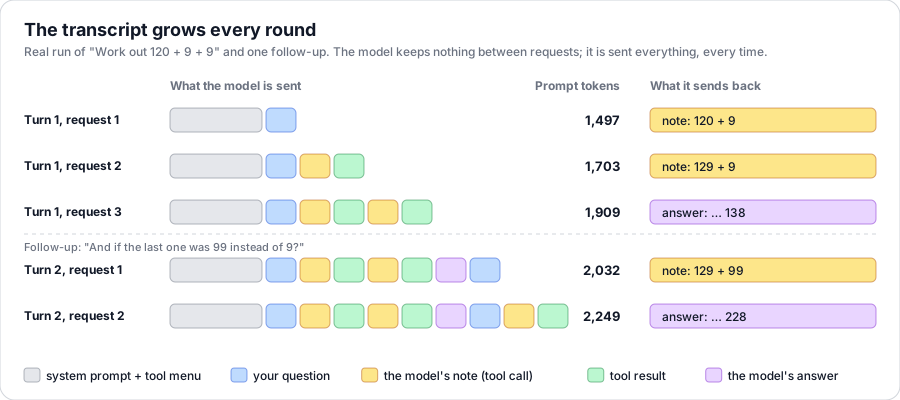 Fig. 3. The transcript grows every round. Each row is one request from the real run, showing what the model was sent and what it sent back. The grey block, system prompt plus tool menu, is the same 1,500 or so tokens every time; everything after it is the conversation so far. Blocks are not drawn to scale.
Two things in this figure are easy to miss. First, the grey block dominates: for a short chat, most of what you pay for is the menu and the rules, sent again with every request. Second, the bottom two rows belong to a second question, and that is where we go next.
A Follow-up Question, Start to Finish
We have followed one turn. A conversation is many turns, so let’s finish with a second question in the same chat and look at the whole transcript.
After “Work out 120 + 9 + 9”, I asked: “And if the last one was 99 instead of 9?”
On its own, that sentence means nothing. Which last one? Instead of what? But the model is sent all six earlier messages along with it, and it replied with a single note:
→ note: solve_with_shortcut({"a":129,"operation":"+","b":99})
← add_nines: 129 + 100 = 229, 229 − 1 = 228. answer 228
→ "When adding 99, use the shortcut of adding 100 first, then subtracting 1. ... So, 129 + 99 = **228**."
Look at a: 129. The model did not redo 120 + 9. It found 129 in an earlier tool result and started from there. That is what “remembering” means here: reading.
Here is the entire messages list at the end, ten entries. As far as anything in the system is concerned, this list is the conversation:
 1  user       Work out 120 + 9 + 9
 2  assistant  note: solve_with_shortcut(120, "+", 9)
 3  tool       add_nines … answer 129
 4  assistant  note: solve_with_shortcut(129, "+", 9)
 5  tool       add_nines … answer 138
 6  assistant  "… So, 120 + 9 + 9 = **138**. Try this one: 85 + 9 + 9."
 7  user       And if the last one was 99 instead of 9?
 8  assistant  note: solve_with_shortcut(129, "+", 99)
 9  tool       add_nines … answer 228
10  assistant  "… So, 129 + 99 = **228**. Try this similar problem: 56 + 99."
The user saw four of these: 1, 6, 7 and 10. The model was sent all of them, every time, plus the system prompt and the tool menu. Everything in between was notes and results passing through the slot.
Testing Without an API Key
If the model is just something that receives a transcript and returns a message, you can swap it for something that returns scripted messages. That is how the whole test suite runs offline:
class FakeClient:
    """Mimics client.chat.completions.create, returning scripted responses in order."""

    def __init__(self, *responses):
        self.responses = list(responses)
        self.requests = []
        self.chat = self
        self.completions = self

    def create(self, **kwargs):
        self.requests.append(kwargs)
        return self.responses.pop(0)
A test scripts the model’s side of the conversation and checks what our side does with it:
client = FakeClient(
    completion(tool_calls=[("solve_with_shortcut", json.dumps({"a": 47, "operation": "+", "b": 9}))]),
    completion(content="Add 10, take 1: **56**"),
)
events = list(TutorAgent(client, "fake").run([{"role": "user", "content": "47 + 9?"}]))
assert events[1].result["solution"]["answer"] == 56
The script plays the model, while the loop, dispatch, the registry and the shortcuts all run for real. What this cannot test is the model itself: whether a real model writes the right note for a given question. For that, the app saves every chat as JSON along with any thumbs-up or thumbs-down, so a bad answer arrives with the exact transcript that produced it.
The same trick produced the traces in this post. My recorder was a thin wrapper with the same create method, passing each call on to the real client and saving what went in and what came out.
Summary
The throughline is that the model only asks, and your code answers. A tool-calling chatbot is not a model that can run things. It is a loop: send the transcript and a menu, get back either an answer or a note, run the note yourself, add the result to the transcript, and send it all again.
Three lessons I keep coming back to:
- The transcript is the memory. The model remembers nothing between requests. Whatever it “knows” about the conversation, it reads from the list you send, which also makes that list the best place to debug.
- The schema is half the prompt. Field descriptions and enums do most of the work of turning “2 h 45 min” into
245, and the same Pydantic class checks what comes back. - Errors are messages too. Returning
{"error": ...}instead of raising lets the model read what went wrong and fix its own note, as it did with 1 h 75 min.
Once you have seen the note go through the slot, you cannot unsee it: the model is a very good writer of notes, and everything that actually happens, happens in your code.